
The AdTik Takeaway:
Expecting a searcher to land on your website via a Google Ad Grant and immediately make a $100 donation on click #1 is a recipe for disappointment. The Google Ad Grant is a top-of-funnel search engine, while paid social (Meta Ads) excels at emotional storytelling and direct conversion. By installing tracking pixels on your Ad Grant landing pages, you transform free search traffic into a custom, high-intent audience on Meta—allowing you to convert warm supporters at a fraction of standard paid advertising costs.
Nonprofit marketers often view advertising channels in silos. The search team manages the $10,000/month Google Ad Grant, while the development team manages paid Meta (Facebook and Instagram) campaigns or email newsletters.
This disconnected approach wastes your most valuable digital asset: the stream of high-intent search traffic coming through your Ad Grant.
While Google Search Ads excel at capturing people actively looking for answers, searchers are rarely ready to open their wallets during their very first visit. They read an article, sign a petition, or view a resource, and then leave.
If you don’t retarget them, up to 95% of those free Grant visitors will never return.
To build a full-funnel marketing engine in 2026, nonprofits must bridge the gap between search and social—using free Search Ads to capture intent, and small paid social budgets to close the donation.
Why Google Ad Grants Need Paid Retargeting
Google Ad Grants only allow text-based Search ads on Google.com. You cannot run Google Display network banners, YouTube video retargeting, or Meta ads using free grant funds.
However, paying to reach completely cold audiences on Facebook and Instagram is becoming increasingly expensive due to rising CPMs (Cost Per Thousand Impressions).
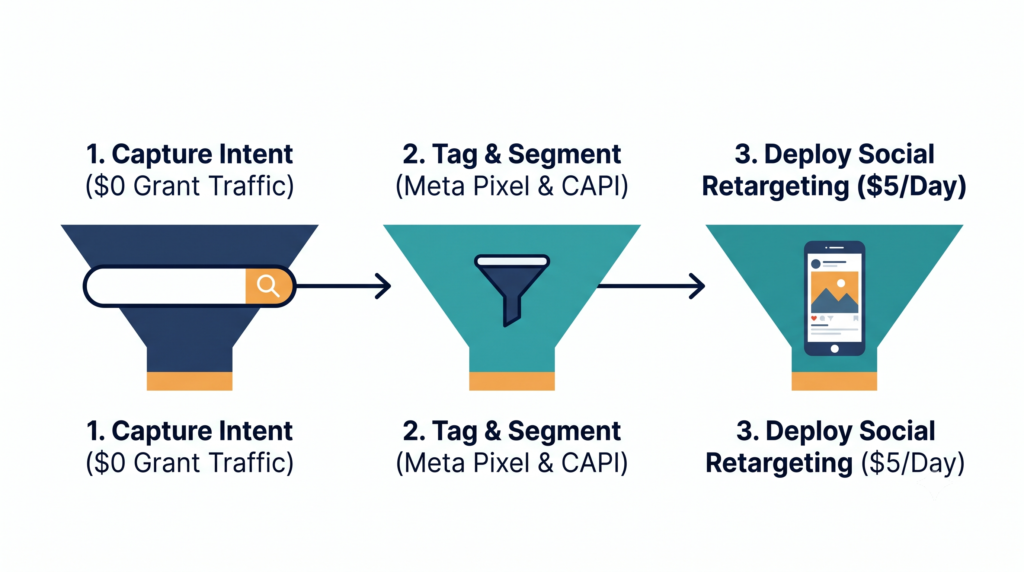
By using your $10,000/month in free Google Search ads to drive traffic to your site, you filter out passive scrollers and capture people who have active, intent-based interest in your cause. Once they land on your site, you can tag them with the Meta Pixel and Conversions API (CAPI), building an ultra-qualified retargeting pool for just a few dollars a day.
The 3-Step Full-Funnel Synergy Blueprint
Step 1: Capture Search Intent (The $0 Top-of-Funnel Engine)
Use your Google Ad Grant to capture broad informational and problem-aware search queries in your niche (e.g., “how to help local foster youth”). Send visitors to educational landing pages. (Ensure these pages follow The Landing Page Post-Mortem Blueprint).
Step 2: Tag & Segment Visiting Traffic
Install the Meta Pixel and Google Ads Tag across your campaign landing pages. Categorize visitors into custom audience tiers based on engagement:
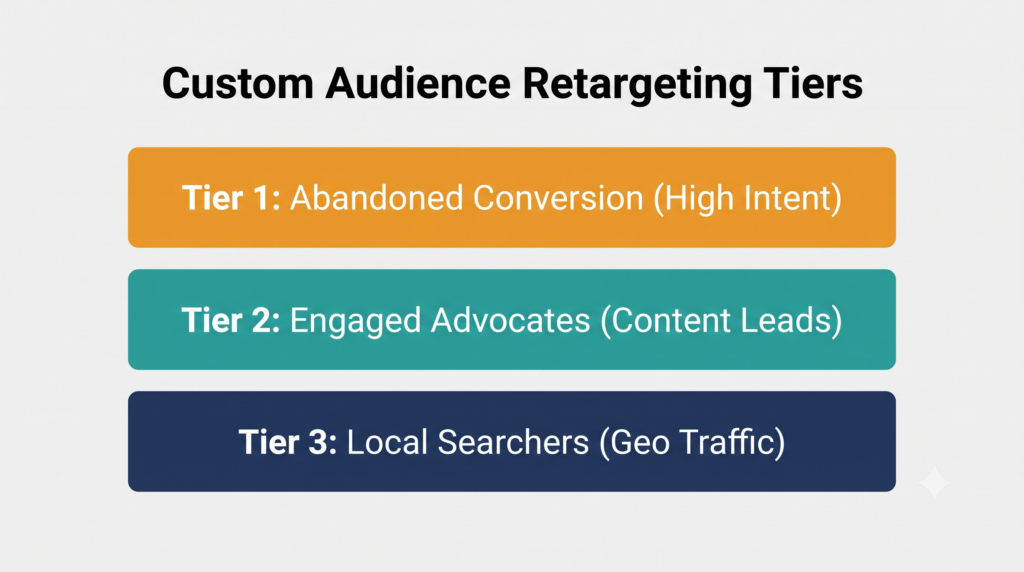
- Tier 1 (Abandoned Conversion): Clicked “Donate” or “Volunteer” but left without submitting.
- Tier 2 (Engaged Advocates): Read an impact article and submitted an email form. (Learn to value-score micro-leads in Value-Scoring Nonprofit Conversions).
- Tier 3 (Local Searchers): Landed on a regional program page via hyper-local search terms. (See Stop Wasting Grant Spend on Global Clicks).
Step 3: Deploy Emotional Retargeting on Paid Social
Launch small-budget paid campaigns on Facebook and Instagram ($5 to $15/day) targeted exclusively to those custom pixel audiences built by your free Grant traffic.
Because these users already know your organization and have researched your cause on Google, your paid social ad copy can jump straight to high-converting emotional hooks:
- “Thanks for reading our flood relief guide! Here is how $25 provides hot meals for a displaced family today.”
- “You took the first step by researching volunteer options. Meet Sarah and see how 2 hours a week changed her life.”
Measuring Retargeting ROAS
Structuring your retargeting parameters ensures you allocate paid social dollars where they yield the highest return on ad spend (ROAS):
$$\text{Retargeting ROAS} = \frac{\text{Total Donation Revenue Driven}}{\text{Paid Social Ad Spend}}$$
Because paid social retargeting targets warm prospects who already visited your site via free Google Search ads, conversion rates are significantly higher, driving down your cost-per-acquired donor.
Compliance & First-Party Privacy in 2026
When setting up cross-channel retargeting, nonprofits must adhere to evolving privacy standards:
- Meta Conversions API (CAPI): Relying solely on browser-based pixels leads to missed tracking data due to ad blockers. Implement CAPI via server-side tracking (through Google Tag Manager or your CMS) to ensure accurate audience building.
- First-Party Data Integration: Upload your offline email subscriber list (built through free Grant downloads) directly to Meta Custom Audiences as a secondary retargeting layer.
- Sensitive Category Compliance: If your organization operates in healthcare or sensitive social advocacy sectors, ensure your Meta pixel configurations comply with regional data protection standards and healthcare advertising restrictions.
Frequently Asked Questions
Can I run retargeting ads using the free Google Ad Grant budget?
No. Google Ad Grants only covers text-based search ads on Google.com. However, you can use the free search traffic generated by your Grant to build retargeting audiences for low-cost paid social campaigns on Meta or paid Google Display networks.
Why don’t Google Ad Grant visitors donate on their first visit?
Search engine visitors are typically seeking immediate answers or information. First-time visitors rarely have an established emotional connection with a nonprofit, making them unlikely to donate immediately without follow-up engagement or retargeting.
How much paid social budget is needed to retarget Google Ad Grant traffic?
Because retargeting audiences are highly specific, budgets can be very small. Most regional nonprofits can run effective Meta retargeting campaigns for $5 to $15 per day, focusing spend entirely on visitors who engaged with their Ad Grant campaigns over the preceding 30 to 90 days.