

The AdTik Takeaway:
Exhausting your $10,000/month Google Ad Grant on nationwide or global clicks might look good on traffic reports, but for regional nonprofits, it’s a vanity metric that drains account performance. By fixing Google’s default location settings, enforcing tight geo-fences, and connecting your Google Business Profile to Search campaigns, regional nonprofits capture local intent for $0 in Grant spend—without paying per lead like commercial Local Services Ads.
Imagine running a regional food bank in Austin, Texas. Your mission is to feed families across three central Texas counties.
You open your Google Ads account, and the dashboard shows thousands of clicks this month. But when you look closer at the geographic reports, hundreds of those clicks came from users in London, Toronto, or Sydney searching for general terms like “food bank support.”
None of those international visitors are going to volunteer on Saturday morning. None of them are dropping off non-perishable goods at your warehouse.
For regional and community-focused nonprofits, broad geographic targeting is the silent budget killer. It creates a flood of zero-intent web traffic that inflates bounce rates, lowers ad relevance, and puts your 5% account CTR compliance at serious risk.
Google’s LSA Migration & The $0 Ad Grant Alternative
In August 2026, Google officially retired the standalone Local Services Ads (LSA) portal, moving pay-per-lead local ads directly into the main Google Ads interface. While commercial service businesses pay $15 to $50+ per lead for local top-of-page placements, Google Ad Grant recipients cannot use free grant dollars to buy pay-per-lead LSAs.
However, nonprofits can achieve local visibility inside Google Search for $0 in ad spend by building a 3-layer hyper-local targeting stack inside their Search Grant campaigns.
The Default Location Trap in Google Ads
The primary reason regional nonprofits end up paying for out-of-market clicks comes down to a single hidden setting inside Google Ads: Location Options.
When you set up a new campaign and select a target location (like “Texas” or “Greater Austin”), Google quietly applies a default targeting rule called “Presence or Interest.”
Under this default setting, anyone anywhere in the world who includes your city’s name in a search query—or who has recently researched your region—is eligible to see your ads. A user in Germany researching “Austin Texas weather” can easily trigger your local volunteer ad.
To lock your spend down to actual community members, you must manually switch this targeting option to Presence: People in or regularly in your targeted locations.
3 Layers of Precision Hyper-Local Targeting
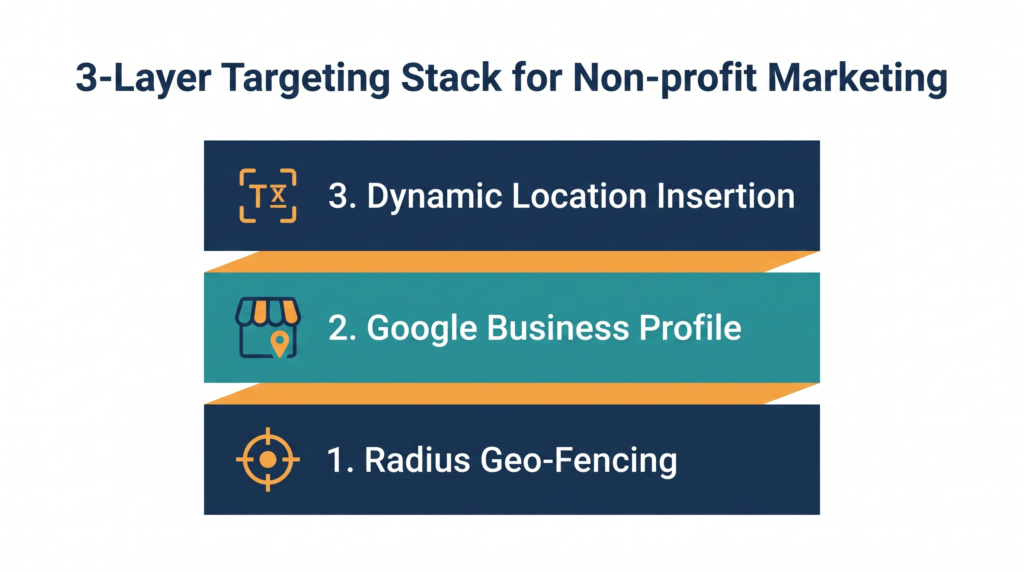
To maximize every dollar of your $10,000/month Grant within your real service footprint, build your campaign targeting using three distinct layers:
- Radius & Zip Code Geo-Fencing: Define boundaries based on operational capacity rather than broad state lines. Set a 10- to 25-mile radius around headquarters, or import donor CRM zip codes to bid aggressively where community support is concentrated.
- Google Business Profile Integration (Location Assets): Link your Google Business Profile (GBP) directly to Google Ads. Enabling Location Assets displays physical addresses, phone numbers, and map pins below text ads on mobile searches, mirroring LSA real estate on mobile devices without per-lead costs.
- Dynamic Location Insertion (DLI) in Ad Copy: Call out local geographic names directly in Responsive Search Ads (RSAs) using Location Insertion: Headline: Volunteer at Our {LOCATION(City):Local} Shelter Today
- Searcher in Round Rock sees: “Volunteer at Our Round Rock Shelter Today”
- Searcher outside detected zones sees: “Volunteer at Our Local Shelter Today”
3 Quick Steps to Fix Your Location Settings Today
- Audit Campaign Location Options: Open Campaigns > Settings > Locations. Expand Location options and select “Presence: People in or regularly in your targeted locations”.
- Review Geographic Reports: Navigate to Locations > Where ads showed. Filter by clicks and add non-service regions to your Excluded Locations list.
- Attach Location Assets: Connect your official Google Business Profile under Assets > Location to enable map extensions account-wide.
Frequently Asked Questions
Can local nonprofits spend their full $10,000/month Google Ad Grant with tight geo-targeting?
Yes, but it requires expanding your keyword universe to cover broad informational, educational, and service-based queries within your local geographic radius rather than relying solely on branded search terms.
Can nonprofits use Google Ad Grant funds for Local Services Ads (LSAs)?
No. Google Ad Grants strictly cover text-based Search Ads on Google.com. However, linking your Google Business Profile and enabling Location Assets inside Search Grant campaigns provides local map presence without per-lead costs.
What is the difference between “Presence” and “Presence or Interest” in Google Ads?
“Presence” restricts ad delivery strictly to people physically located inside your target geographic area. “Presence or Interest” allows Google to show ads to anyone worldwide who searches for topics related to your target location.