

The AdTik Takeaway:
In an era of AI-driven broad match and automated queries, negative keywords are no longer just an optional optimization—they are your primary defense against compliance suspensions and wasted spend. Without a proactive negative keyword strategy, Google’s automated search expansion will trigger your ads on job seekers, student researchers, and generic definition queries. Building a structured, account-level negative keyword list eliminates zero-intent impressions, keeps your Quality Scores high, and safeguards your 5% monthly Click-Through Rate (CTR) requirement.
When you scale a Google Ad Grant account by expanding keywords and adopting Smart Bidding, an invisible side effect occurs: search noise explosion.
Google’s algorithms are designed to match your ads to queries that are conceptually related to your keywords. While this helps discover fresh search volume, it also opens the door to thousands of searches that carry zero intent to support your organization.
If you target the phrase “youth homelessness,” Google might show your ad to:
- A college student typing “youth homelessness statistics essay pdf”
- A job seeker searching “youth shelter social worker salary”
- A researcher looking for “history of youth homelessness in America”
Every time your ad impressions fire for these queries without earning a click, your Click-Through Rate drops. If your overall account CTR falls below 5% for two consecutive months, Google automatically suspends your Grant.
To prevent algorithmic drift and safeguard compliance, nonprofits must deploy a proactive Master Negative Keyword Framework.
Why Standard Negative Lists Fail in 2026
Historically, account managers added negative keywords reactively by scrolling through search term reports once a month and blocking specific bad queries. In today’s search landscape, reactive management is too slow. AI-generated search queries evolve daily, meaning thousands of wasteful impressions hit your account before you ever review a report.
The Negative CTR Formula
Negative keywords protect your account CTR by trimming empty, unclicked impressions from your denominator:
$$\text{CTR Improvement} = \left( \frac{\text{Total Clicks}}{\text{Total Impressions} – \text{Filtered Noise Impressions}} \right) \times 100\%$$
By aggressively filtering out zero-intent impressions, your account CTR stays safely above the mandatory 5% baseline. (If your account is dealing with a CTR suspension warning, follow The Emergency Account Recovery Playbook).
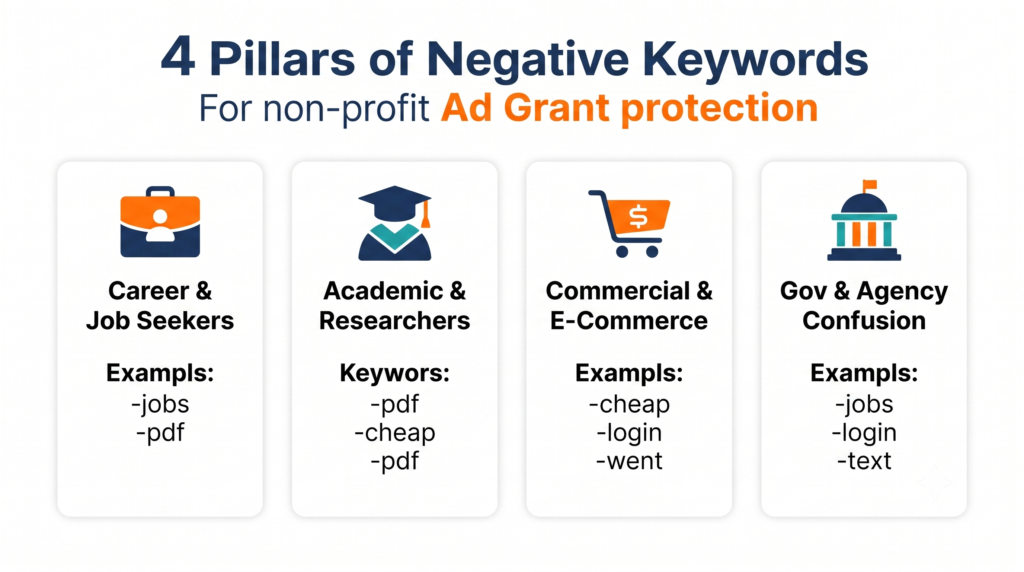
The 4 Nonprofit Negative Keyword Pillars
A robust nonprofit negative framework categorizes unwanted queries into four distinct pillars. Adding these lists at the Account Level ensures that bad traffic is blocked across every campaign simultaneously:
- Pillar 1: Career & Job Seekers: Block searchers expecting employment portals (“jobs”, “careers”, “hiring”, “salary”, “glassdoor”, “resume”, “internship”, “employment”).
- Pillar 2: Academic Researchers & Students: Block users seeking homework answers or research papers (“pdf”, “essay”, “research paper”, “statistics”, “history of”, “definition”, “citation”).
- Pillar 3: Commercial & E-Commerce Hunters: Block commercial buyers (“cheap”, “buy”, “discount”, “coupon”, “promo code”, “for sale”, “wholesale”, “clearance”).
- Pillar 4: Direct Relief & Government Agency Confusions: Block state agency queries (“ebt login”, “food stamps application”, “unemployment phone number”, “government grant check”).
Negative Keyword Match Types Cheat Sheet
- Negative Exact (-[volunteer jobs]): Blocks the ad only if the search query matches the exact phrase word-for-word. Best for specific phrases where individual words might be acceptable elsewhere.
- Negative Phrase (-“job opening”): Blocks the ad if the exact phrase appears anywhere within the user’s search query. Best for multi-word phrases like “glassdoor review” or “salary range”.
- Negative Broad (-jobs): Blocks the ad if the word appears anywhere in the query, regardless of order. Best for single power words like jobs, essay, or pdf.
Integrating Negatives with Bidding Strategies
When scaling your budget using Maximize Conversion Value or Maximize Conversions, Google’s AI needs clean boundary markers. (Learn to structure account bidding in Unlocking the Full $10,000/Month).
Removing irrelevant search queries prevents Smart Bidding from spending ad dollars on non-converting users. (Read Value-Scoring Nonprofit Conversions to align bidding signals with real impact).
Frequently Asked Questions
Will adding too many negative keywords restrict my Google Ad Grant spend?
No. Adding negative keywords only removes zero-intent search noise that would otherwise result in unclicked impressions or instant bounces. Removing bad traffic improves your Quality Score and account CTR, making Google more likely to show your ads for high-intent search queries.
What is the difference between campaign negative keywords and account-level negative lists?
Campaign negative keywords only apply to one specific campaign. Account-level negative keyword lists apply globally across every campaign in your account, ensuring universal junk terms (like “jobs” or “pdf”) are blocked everywhere automatically.
How often should a nonprofit review search term reports?
Even with a Master Negative Keyword Framework in place, nonprofits should review search term reports bi-weekly to catch emerging query trends, seasonal search noise, or location-based misdirections.